It is Friday afternoon and your office manager has 40 overdue invoices to chase. She exports the aged debtors report, pastes it into the free version of ChatGPT on her phone and asks for a polite reminder email for each client. Ten minutes later the emails are written, and written well.
She has also just put client names, contact details and amounts owing into a personal account on a consumer AI service, under terms your business never agreed to. Nobody told her not to. That is shadow AI: staff using AI tools the business has not approved, usually with good intentions and usually without anyone knowing.
This article covers how common it is in Australian workplaces, why the answer is not to ban AI, the Privacy Act change that starts on 10 December 2026 and a one page AI use policy you can adapt for your own business.
How common is shadow AI in Australia?
More common than most owners assume. The University of Melbourne and KPMG surveyed Australians as part of a 47 country study of trust in AI, conducted between November 2024 and January 2025. Among Australian workers:
- 49% said they intentionally use AI regularly in their work.
- Almost half of those who use AI (48%) admitted using it in ways that go against company policy, including uploading sensitive company information into free public tools like ChatGPT.
- 60% said they have hidden their use of AI at work.
- 57% have relied on AI output without checking it, and 59% have made mistakes in their work because of AI.
- Only 30% said their organisation had a policy on generative AI use.
Put those together and the picture is clear. Staff are using AI because it saves them time, most businesses have not told them how to use it safely and a lot of the use is happening where nobody can see it.
The problem is the free tools, not AI
The risk depends almost entirely on which version of a tool someone uses and how they are signed in.
OpenAI says that for its consumer services, including free ChatGPT, it may use your content to train its models unless you switch off the "Improve the model for everyone" setting. By default, it does not train on content from ChatGPT Business, Enterprise or its API. Microsoft says that when staff use Microsoft 365 Copilot Chat signed in with a work account, their prompts and responses are covered by enterprise data protection and are not used to train the underlying models.
So the same task, summarising a client spreadsheet, can be low risk in one tool and a privacy incident in another. That is why banning AI rarely works. People switch to their phones and the use goes further underground. The better approach is to give staff an approved tool that is at least as convenient as the free one, and be specific about what can go into it.
This is not a hypothetical risk. In October 2025 the NSW Reconstruction Authority disclosed that a former contractor had uploaded a spreadsheet of more than 12,000 rows to ChatGPT in March that year. It held names, addresses, contact details and some health information for up to 3,000 people who had applied to a flood recovery program. The OAIC's own guidance on commercially available AI products is blunt: as a matter of best practice, do not enter personal information, and particularly sensitive information, into publicly available generative AI tools.
The Privacy Act change that starts on 10 December 2026
Shadow AI is mostly about what goes into AI tools. The next Privacy Act change is about what comes out of them, specifically decisions made about people.
From 10 December 2026, new transparency rules in Australian Privacy Principle 1 apply where a business has arranged for a computer program to make a decision, or to do something substantially and directly related to making a decision, that could reasonably be expected to significantly affect an individual's rights or interests, and personal information is used in the program. If that describes you, your privacy policy must say:
- the kinds of personal information used in those programs
- the kinds of decisions made solely by a computer program
- the kinds of decisions where a computer program does something substantially and directly related to the decision.
This is a disclosure obligation. It does not ban automated decisions, but it does mean you need to know where they happen in your business, which many do not.
Does it apply to your business?
It applies to APP entities, the organisations covered by the Privacy Act. Broadly, that is any business with annual turnover above $3 million. Some smaller businesses are covered regardless of turnover, including health service providers that hold health information, businesses that trade in personal information and contracted service providers to the Commonwealth. If you run a medical, dental or allied health practice, assume you are covered.
The small business exemption is staying for now. The government released an exposure draft of the next round of privacy reforms, the Privacy Amendment (Personal Data Protection) Bill 2026, and consultation closed on 18 September 2026. The draft keeps the small business exemption, and legislation is expected to be introduced before the end of the year.
Where automated decisions hide in a typical business
Most SMBs are not running credit scoring models. But plenty are using software that makes or shapes decisions about people without anyone thinking of it that way:
- recruitment platforms that automatically reject applicants based on screening questions, or rank CVs before a person sees them
- accounting or credit tools that decide whether a customer gets an account, a credit limit or payment terms
- tenancy application scoring used by property managers
- quoting engines that set individual prices or terms
- fraud or risk rules that automatically block a customer or hold a payment
- online scheduling or triage rules that decide who gets an appointment or service.
The grey area is where AI prepares the ground and a person signs off. If the person mostly accepts what the system recommends, treat it as covered. The OAIC ran a consultation in May and June 2026 to shape its guidance on these rules, and that guidance is worth reading when it lands. The December 2024 amendments also gave the OAIC the power to issue infringement notices for some privacy policy failures, so an out of date policy is no longer a harmless oversight.
A one page AI use policy you can adopt
The 2026 edition of the SMB1001 cyber security standard added a requirement for a formal AI use policy, and this is the kind of document it has in mind. Adapt the words in square brackets and keep it to one page. A policy people read beats a thorough one nobody opens. When you need more, such as an approved tools list, information levels and a staff sign off page, download our free AI use policy template in Word.
[Business name] AI use policy
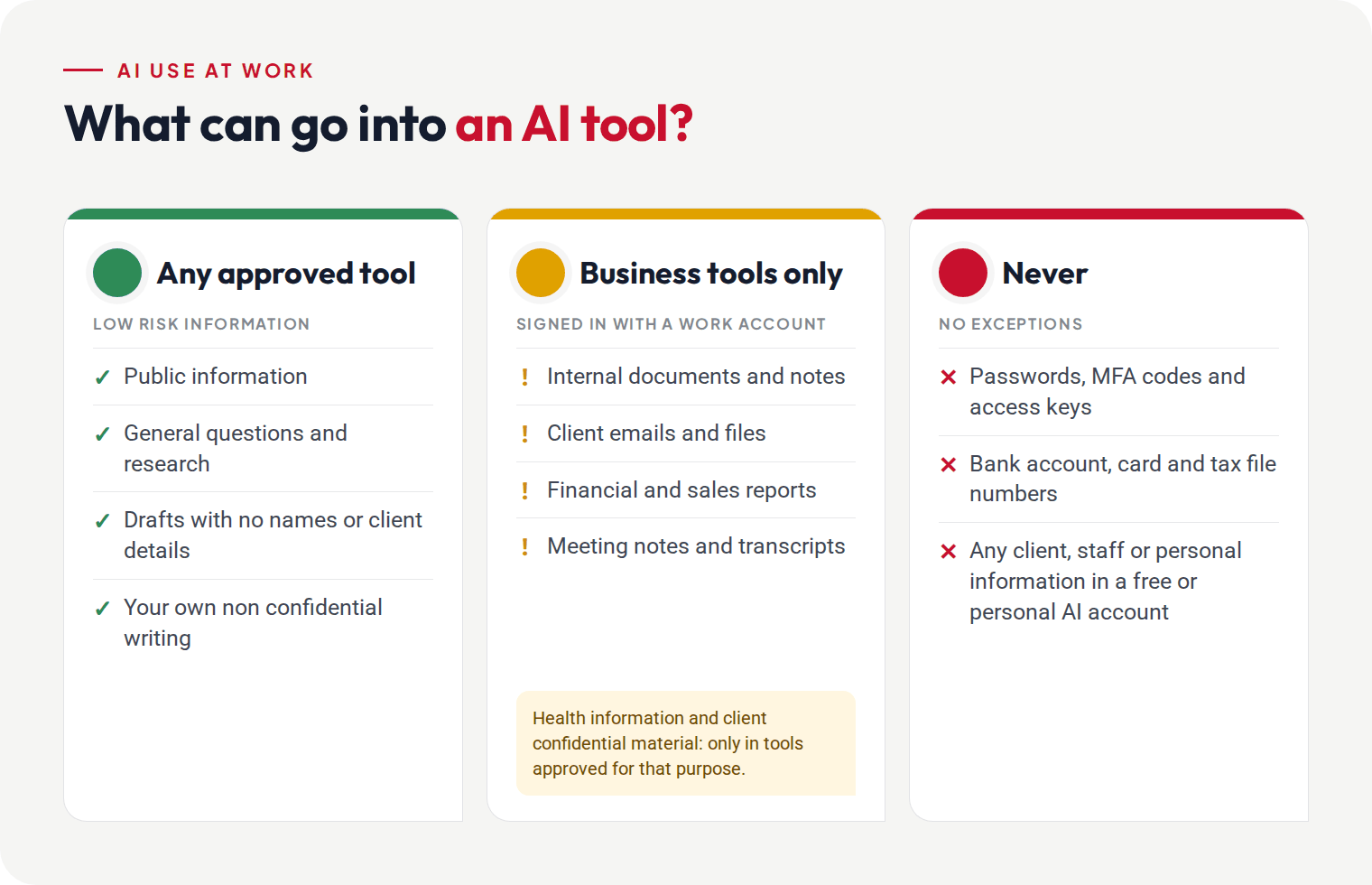
- Approved tools. For work, use only [Microsoft 365 Copilot Chat, signed in with your work account] and [any other approved tool]. Ask [IT contact] before using anything else with work information.
- Never put these into any AI tool: passwords, MFA codes or access keys; bank account, card or tax file numbers.
- Health information and anything a client has marked confidential only go into tools [IT contact] has approved for that specific purpose.
- Personal and free tools: no client names, staff details, financial information or internal documents. Public information and general questions only.
- You own the output. AI output is a first draft. Check facts, figures, names and advice before it goes to anyone, and do not present it as professional advice without review.
- Be open about it. Tell your manager when AI has materially shaped a piece of work, and follow any client requirements about disclosing AI use.
- No automated decisions about people without approval. Do not use AI or automation to decide on, rank or screen job applicants, customers, credit or pricing for individuals without sign off from [role].
- Meetings. Ask everyone present before an AI notetaker records or transcribes a meeting.
- Mistakes. If you have put something into an AI tool that you should not have, tell [IT contact] straight away. Reporting early is always the right call.
- Review. This policy is reviewed every six months by [role].
Approved by [name, role] on [date].
Five things that make the policy stick
- Give people an approved tool that is easy to use. For most Microsoft 365 businesses that is Copilot Chat signed in with a work account. If people need more, look at Microsoft 365 Copilot or a business plan of another tool, not personal accounts.
- Fix permissions before you roll out Copilot. Microsoft 365 Copilot can surface anything a user already has access to, so an overshared SharePoint site or a "whole company" link to the payroll folder becomes a problem very quickly.
- Use the controls you already pay for. Web filtering can block or warn on unapproved AI sites, and sensitivity labels and data loss prevention in Microsoft 365 can stop the most sensitive files being shared.
- Train with real examples. The Friday afternoon invoice scenario lands better than a slide about data governance. Build it into your security awareness training.
- Map your automated decisions before 10 December. List the systems that make or shape decisions about customers, applicants or staff, then update your privacy policy to match. For most SMBs that is a few hours of work if you start now, and a scramble if you leave it to December.
How we help
We help businesses roll out AI safely: choosing and configuring the tools, cleaning up Microsoft 365 permissions before Copilot goes live and setting up the web filtering and data protection controls that back up a policy. See our AI and automation consulting and managed Microsoft 365 services, or get in touch for a conversation about where AI is already being used in your business.
Shadow AI questions we get asked
Is it illegal for staff to use ChatGPT at work?
No. The risk is what goes into it and which version they use. Personal information entered into a consumer tool can breach your Privacy Act obligations and your client contracts, even if the tool itself is fine to use.
Is Microsoft Copilot safe for client data?
Signed in with a work account, Copilot Chat is covered by Microsoft's enterprise data protection, and prompts are not used to train the underlying models. Microsoft 365 Copilot also respects your existing permissions, which is why fixing oversharing comes first.
Does the 10 December change apply to small businesses?
Only if you are covered by the Privacy Act. Most businesses under $3 million turnover are exempt, but health service providers and some others are covered regardless of size.
Do we have to tell clients we use AI?
Outside the automated decision rules, there is no general legal requirement. Some client contracts and professional rules do require it, so check yours, and when in doubt, tell them.
This article is general information, not legal advice.
Sources
- University of Melbourne and KPMG, Trust, attitudes and use of AI: the Australian story (2025)
- OAIC, Guidance on privacy and the use of commercially available AI products (October 2024)
- OAIC, Consultation on guidance for transparency in automated decision making (May 2026)
- OAIC, APP guidelines, chapter 1
- ABC News, Major data breach as up to 3,000 flood victims' details loaded to ChatGPT (6 October 2025)
- OpenAI, How your data is used to improve model performance
- Microsoft, Enterprise data protection in Microsoft Copilot and Copilot Chat
- Ashurst, Australia's 2026 privacy reforms: a first look (September 2026)